The difference between signed & unsigned SensePrints and how to set the issuers key pairs.
When starting up the server, there is an option for the user to generate a property called the issuers_private_key.
What this does is to generate a private-public key pair based on the secp256k1 cipher. The private key resides within the server, and is then used to sign the SensePrint during the generation of the SensePrint. This SensePrint can then be verified to have originated from the issuer using the public key to check and confirm.
In the online mobile SDK version, since there is a link with the issuer server, the verifier can simply send a request to the issuer server to confirm the validity of a certain SensePrint. However, in the offline mobile SDK version, since there is no link with the issuer server, the offline SDK itself needs to have the corresponding public key in order to verify that the SensePrint has indeed been originated from the correct issuer. This is defined in the ISSUERS_PUBLIC_KEY property of the offline SDK. Hence, in the offline SDK, this property needs to be set IF the server that generates the SensePrint has a issuer's private key set. Otherwise, an error will be thrown when trying to verify the SensePrint using the offline SDK.
issuers_private_keyHow does the Certificate Authority (CA), FacePKI and issuers_private_key fit and work together?
What is the link between the Certificate Authority (CA) and the FacePKI?
In SenseCrypt FacePKI, the SenseCrypt server can generate Face Certificates using SensePrints. These Face Certificates enable face-based signing and encryption. However, how does the user of the Face Certificates know that it is actually generated from the legitimate issuer? To do this, the SenseCrypt server also has to be a Certificate Authority. This means that it has to issue a root certificate which verifiers can then use to check that the Face Certificates are from the legitimate source.
What is the link between a Certificate Authority and the issuers_private_key?
As mentioned in the previous section, the CA has to issue the root certificate. This root certificate is essentially a public key that can be used to check if the underlying SensePrint of the Face Certificate is signed from the associated private key (
issuer_private_keyFace Certificate Generation - Online
✅ `issuer_private_key` is used to sign the generated Face Certificate.
❌ Not possible. FC needs to be signed.
Face Certificate Generation - Offline
❌ There is no `issuer_private_key` to sign the Face Certificate. Face Certificate will not be generated.
❌ Not possible. FC needs to be signed.
Face Certificate Verification - Online
✅ The issuer server checks that the FC is signed from the same issuer server.
❌ Not possible. FC needs to be signed.
Face Certificate Verification - Offline
❌ Currently FC can't be verified offline.
❌ Not possible. FC needs to be signed.
SensePrint Generation - Online
✅ `issuer_private_key` is used to sign the SP during generation
✅ SP generated, but is not signed.
SensePrint Generation - Offline
❌ `ISSUERS_PUBLIC_KEY` set in the offline SDK will throw an error for SP generation.
✅ SP generated, but is not signed.
SensePrint Verification - Online
✅ The issuer server checks that the SP is signed from the same issuer server
✅ SP verified. However, no verification of source legitimacy.
SensePrint Verification - Offline
✅ The `ISSUERS_PUBLIC_KEY` set in the offline SDK will verify that the SP has been signed by the Issuer.
✅ SP verified. However, no verification of source legitimacy.
Why is SenseCrypt non-biometric in nature?
As we have seen in the previous section, traditional Face Recognition depends on generating and storing a biometric template during enrollment and then, subsequently, generating and comparing a new template during verification.
Since two generated feature vector / templates can be compared, then if one is stored in a database operated by company A, and the other is stored in a database operated by company B, a comparison can be made between them to determine if it is the same person.
This is despite the fact that company A and company B may be unrelated to each other. This violates the principle of Unlinkability in a Privacy by Design framework.
The ability to compare feature vectors / templates with one another in traditional biometrics is what makes the stored data biometric in nature.
To enable privacy preservation, a system should be able to generate any number of different data structures (akin to feature vectors / templates) from a single image. If it does so, then the data structures thus generated cannot be compared to one another.
Since there is no way to compare the data structures generated by a privacy preserving framework, if they were stored in separate databases, there would be no way to find out that the data structures correspond to the same person. This satisfies the principle of Unlinkability in a Privacy by Design framework. This is also what makes the data structures non-biometric in nature.
We have seen how two Privacy Preserving data structures generated from exactly the same data cannot be compared to each other to determine any kind of similarity.
But, given a Biometric Sample (such as a facial image), can it be determined that the Privacy Preserving data structure was generated from a similar biometric sample?
As it turns out, the above is made possible through the SenseCrypt algorithm.
Thus, even though the data structures (SensePrints) generated by SenseCrypt algorithm are non biometric in nature, they can be used for Biometric Verification.
Additional information
In this section you can find additional information to guide you in your eID journey.
The section talks about the privacy focused features of SensePrints and how they can be verified without storing biometrics.
The section outlines the fundamental privacy by design goals that the system seeks to build on.
Finally, the section highlights how SenseCrypt technology can fit within a bigger picture of a national ID framework having one foundational eID (SensePrint) and multiple privacy preserving functional eIDs (Face Certificates).
How Face PKI enables functional eID
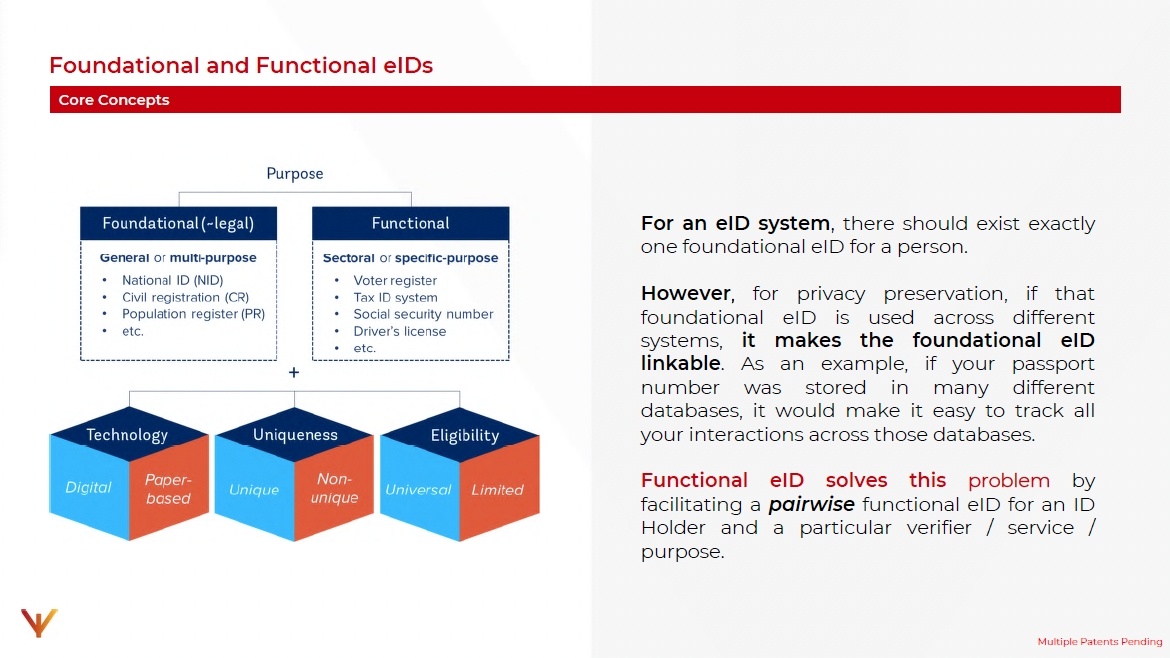
For an eID system, there should exist exactly one foundational eID for a person.
However, for privacy preservation, if that foundational eID is used across different systems, it makes the foundational eID linkable. As an example, if your passport number was stored in many different databases, it would make it easy to track all your interactions across those databases.
Functional eID solves this problem by facilitating a pairwise functional eID for an ID Holder and a particular verifier/service/purpose.
Functional eID is enabled through SenseCrypt's Face PKI features. The following steps decribe how this works:
Root Certificate - The issuer of the foundational ID has a root certificate that all verifiers can trust. All verifiers, first obtain the root certificate and cache it.
Foundational eID Issuance - After authenticating a prospective eID candidate, the ID issuer issues a SensePrint eID. This eID forms the foundation eID.
Face Certificate (functional eID) - When the eID holder interacts with a service, the service (verifier) needs to validate that the holder is real. To do so, the service requests the holder for a Face Certificate that is signed by the foundational eID's issuer. Such a Face Certificate contains a unique public key of the eID holder. The public key is, however, different for each verifier/service/purpose thus preserving privacy through unlinkability.
A Face Certificate is generated from a user's face, and their SensePrint eID. It is generated for a particular purpose ID. The same purpose ID must be specified while verifying the eID holder using a Face Certificate. Since the purpose ID is expected to be unique for every service that the user interacts with, the public key in the Face Certificate is pairwise and preserves privacy through unlinkability.
The verifier can trust the Face Certificate provided by an eID holder is authentic by verifying its signature using the trusted Root Certificate. The Face Ceritifcate can be cached by a verifier after a first functional eID verification performed in the step described below.
Functional eID Verification - When a user presents a Face Certificate to a verifier, the verifier only knows that the certificate is valid and has been issued by the foundational eID issuer. To verify that it is the actual eID holder who is presenting the certificate, the verifier presents a random challenge to the holder (e.g. a UUID). The eID holder must sign the challenge using an ephemeral private key that is generated from their face, their SensePrint eID, and for the specified service/purpose ID. The challenge is signed with the ephemeral private key and transmitted back to the verifier. The verifier can then verify the signature using the public key that is contained in the eID holder's Face Certificate.
A Face Certificate allows the verification of an eID holder using their face without a verifier having (or processing) the holder's face!
Privacy by Design principles for systems
In the previous section we have seen how SensePrints are data structures that are privacy preserving (it cannot be determined that two SensePrints, when compared to each other, were generated from the same person's face).
We have also seen how SensePrints have the property of Biometric Verifiability (given a person's face and a SensePrint, it is possible to verify that it was the same person for whom the SensePrint was generated earlier).
In this section, we highlight the Privacy by Design principles that should underscore any good system.
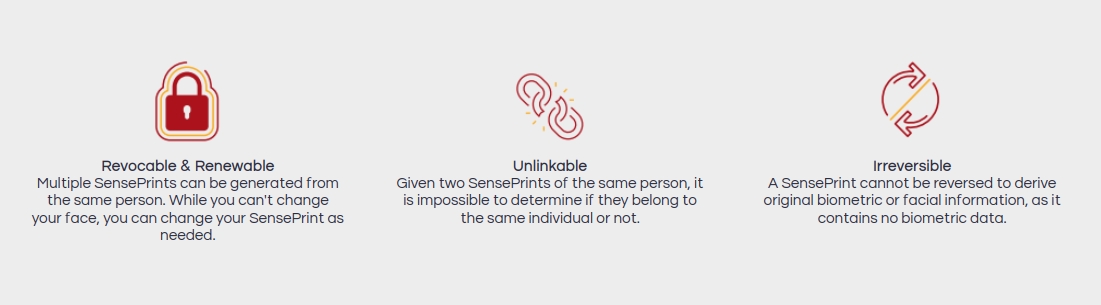
Unlinkability - Given two data structures (SensePrints) alone, it should be impossible to tell if they were generated from the same data (face + metadata) or from different data.
Revocability and Renewability - In traditional systems, it is possible to generate only one feature vector / template from a single image. Multiple SensePrints can be generated from the same person. While you can't change your face, you can change your SensePrint as needed.
If a SensePrint needs to be replaced, a new one can be generated from exactly the same image and data and such a SensePrint would be entirely different from the one being revoked.