Expand the /senseprint-qr section and then click the Try it out button as shown below:
Expand the /senseprint-qr section and then click Try it out
After clicking the Try it out button, the following JSON text will become editable:
{"check_live_face_before_creation":false,"cleartext_data":{"masked_id":"A0123xxx"},"face_base_64":"face_image_bytes_as_base64","liveness_tolerance":"REGULAR","metadata":{"address":"123 Main St.","name":"John Doe"},"os":"DESKTOP","password":"(optional)","qr_format":"PNG","record_id":"A0123453","ref_face_base_64":"(optional) when specified, the face_base_64 will be compared to this reference face and the SensePrint will only be generated if the faces match","require_live_face":true,"tolerance":"REGULAR","verifiers_auth_key":"(optional) when specified, the SensePrint will require this key to decrypt"}
A SensePrint eID QR code contains two sets of attributes. The first set of attributes called cleartext_data can be accessed by an authorized SensePrint reader without the eID holder's face.
The second set of attributes called metadata can only be accessed after scanning the eID holder's face.
check_live_face_before_creation will check if the face in face_base_64 is live (no spoofing detected)
face_base_64 is an image of the eID holder's face represented as a Base64 string. Most programming libraries will provide a way to convert a file to Base64, but for a quick demonstration, you can use this page to convert an image to a Base64 string.
The record_id is a field that represents the primary key or identification number of the eID.
ref_face_base_64 (optional) is a reference facial image that eID holder's face is compared with. The SensePrint will only be generated when the reference face matches with the eID holder's face. As an example use case, this could be an image from an ID document for e-KYC purposes.
If require_live_face is set to true during SensePrint verification (decryption) a liveness check will be performed before a face is accepted to decrypt the metadata.
If a password (optional) is specified, the eID holder will need to provide a password in addition to their face scan.
The tolerance (optional) parameter specifies the strictness of the algorithm in matching a face. The default value of REGULAR should suit most purposes.
The verifiers_auth_key (optional) parameter specifies a secret that is shared with a verifier of the eID. If it is specified, the verifier must specify the same value while trying to decrypt the SensePrint.
The os (optional) parameter is only used when check_live_face_before_creation is set to true. It indicates the operating system the image was captured on. Valid values are ANDROID / IOS / DESKTOP.
The liveness_tolerance (optional) parameter is only used when check_live_face_before_creation is set to true. This parameter specifies the level of strictness that the liveness algorithm uses. The default value of REGULAR should suit most purposes.
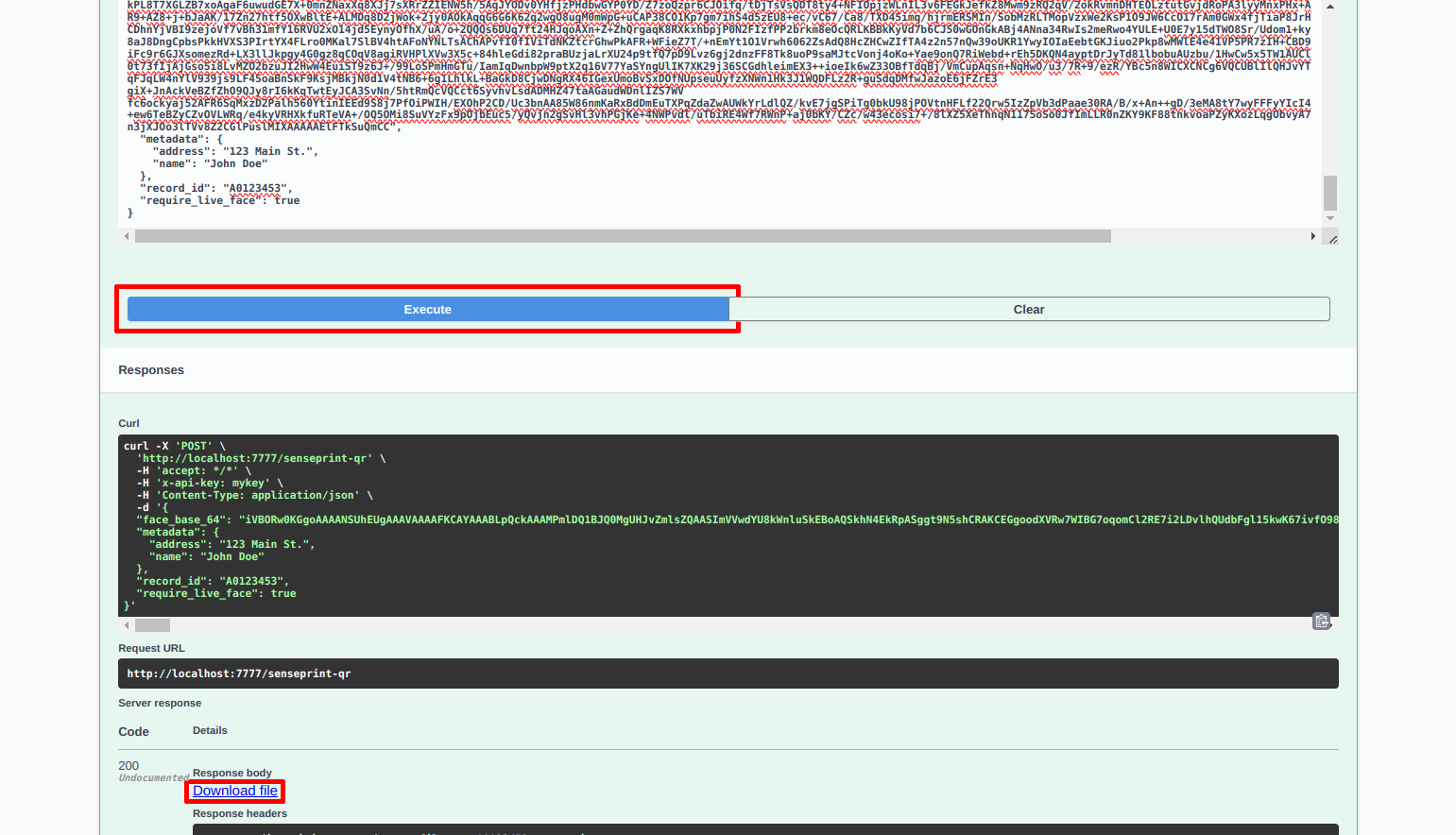
The following shows a sample JSON text to generate a QR:
To generate the QR code, click Execute and then Download file as show:
Click Execute and Download file to get your first SensePrint QR code
The QR code thus generated can now be included in either a physical or digital eID document and verified (and decrypted) via the SenseCrypt Mobile SDKs.